Explore Connections, Not Just Results
Interactive graph visualization of document connections across your local knowledge base. Explore wiki links, markdown links, and semantic similarity, then jump straight into the source note.
Key Benefits
- Interactive force-directed visualization
- Wiki links, markdown links, and similarity edges
- Filter by collection
- Click nodes to navigate to documents
- Zoom, pan, and explore
- CLI and REST API access
Example Commands
gno graph
gno graph --collection notes
gno serve # then /graph
Get Started
Ready to try Knowledge Graph?
Visualize Your Knowledge
See your document connections at a glance. The Knowledge Graph renders your notes as an interactive constellation—nodes are documents, edges are links between them.
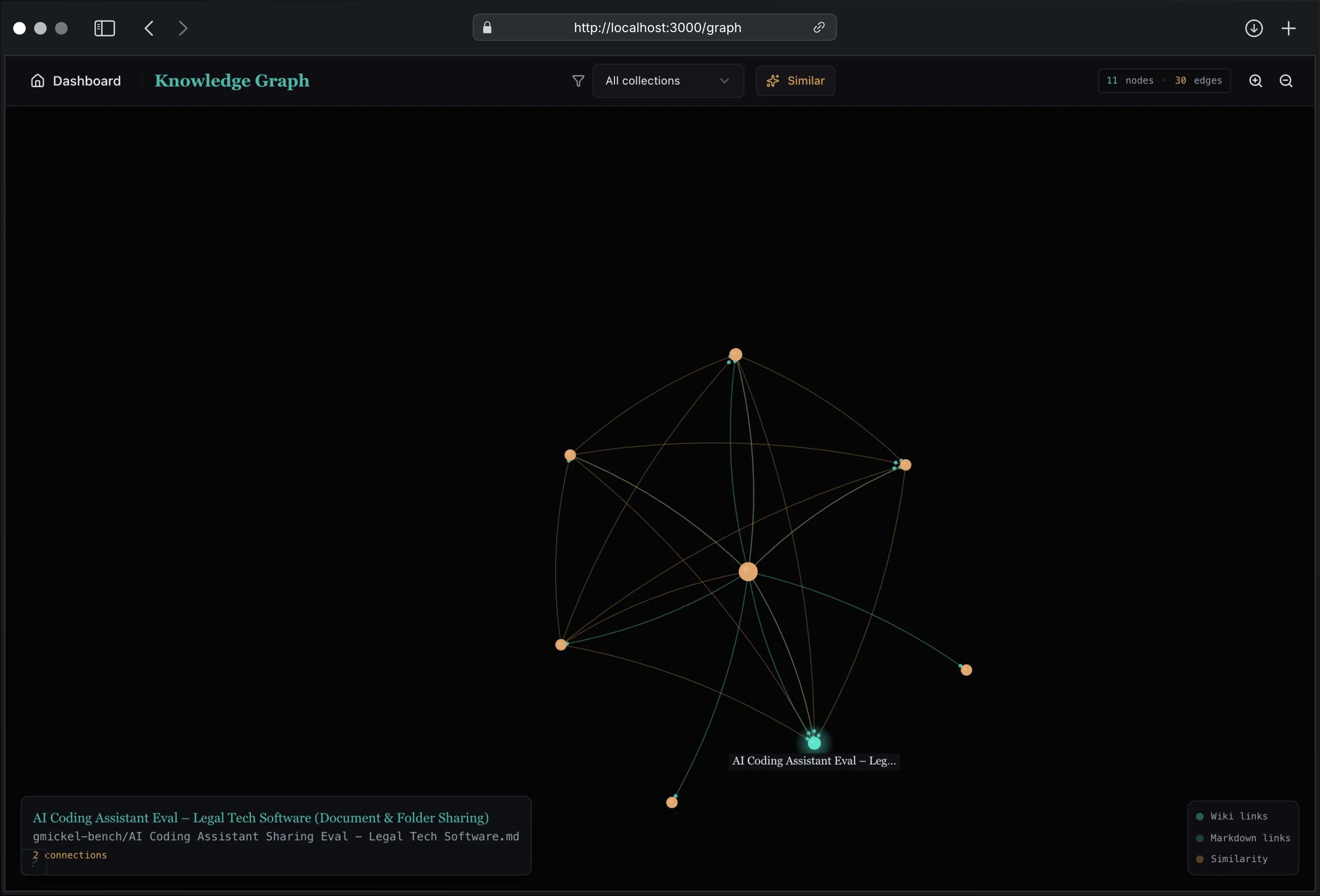
What You’ll See
- Wiki links:
[[Document Name]]connections shown as teal edges - Markdown links:
[text](path.md)shown as lighter edges - Similar documents: Optional gold edges for semantically related notes (requires vector index)
Web UI
Access the graph at http://localhost:3000/graph after starting the server:
gno serve
Navigation
- Click a node to navigate to that document
- Hover to see document title and connection count
- Scroll to zoom in/out
- Drag to pan the view
- Use the +/- buttons for zoom controls
Filtering
- Collection filter: Focus on a single collection
- Similar toggle: Show/hide semantic similarity edges (golden lines)
Legend
The bottom-right legend shows edge types:
- Teal: Wiki links (
[[...]]) - Light teal: Markdown links (
[...](...)) - Gold: Similarity connections (when enabled)
CLI Access
Generate graph data from the command line:
# Full graph
gno graph

# Filter by collection
gno graph --collection notes

# JSON output
gno graph --json

# Include similarity edges
gno graph --similar

# Limit nodes/edges
gno graph --limit 500 --edge-limit 2000
Options
| Flag | Description | Default |
|---|---|---|
--collection |
Filter to single collection | all |
--limit |
Max nodes to return | 2000 |
--edge-limit |
Max edges to return | 10000 |
--similar |
Include similarity edges | false |
--threshold |
Similarity threshold (0-1) | 0.7 |
--linked-only |
Exclude isolated nodes | true |
--json |
JSON output | false |
REST API
Programmatic access via HTTP:
# Basic graph
curl http://localhost:3000/api/graph

# With options
curl "http://localhost:3000/api/graph?collection=notes&includeSimilar=true&limit=1000"
Query Parameters
| Param | Description | Default |
|---|---|---|
collection |
Filter to collection | - |
limit |
Max nodes | 2000 |
edgeLimit |
Max edges | 10000 |
includeSimilar |
Include similarity edges | false |
threshold |
Similarity threshold (0-1) | 0.7 |
linkedOnly |
Exclude isolated nodes | true |
similarTopK |
Similar docs per node | 5 |
Response
{
  "nodes": [
    {
      "id": "doc-123",
      "uri": "notes/my-note.md",
      "title": "My Note",
      "collection": "notes",
      "relPath": "my-note.md",
      "degree": 5
    }
  ],
  "links": [
    {
      "source": "doc-123",
      "target": "doc-456",
      "type": "wiki",
      "weight": 1
    }
  ],
  "meta": {
    "totalNodes": 150,
    "totalEdges": 320,
    "truncated": false
  }
}
Use Cases
- Knowledge exploration: Discover unexpected connections
- Documentation audit: Find orphaned or poorly-connected docs
- Research navigation: Follow citation chains visually
- Onboarding: Help new team members understand doc structure
- Content planning: Identify gaps in your knowledge base
Performance
The graph handles large collections efficiently:
- Default limits: 2000 nodes, 10000 edges
- Particle animations disabled for 500+ edges
- Lazy-loaded graph library (~250KB)
- Client-side caching for smooth navigation
For very large graphs, filter by collection or adjust limits.
Getting Started
# Index your documents
gno index

# Start the web server
gno serve

# Open the graph
# http://localhost:3000/graph
Or via CLI:
gno graph --json | jq '.nodes | length'
# 142