A Local Knowledge Workspace, Not Just a Dashboard
GNO's web UI is now a full local knowledge workspace for searching, browsing, graph exploration, safe editing, note capture, and AI answers across your own documents.
Key Benefits
- Split-view markdown editor with live preview
- Quick capture for instant note creation
- Safe markdown/plaintext editing with read-only converted docs
- Cross-collection tree browse workspace with folder detail panes
- Visual search with BM25, vector, and hybrid modes
- AI answers with citations
- Keyboard-first design
- Instant refresh after edits with external-change awareness
- Live preset switching
- 100% local, no cloud
Example Commands
gno serve
gno serve --port 8080
Get Started
Ready to try Web UI?
Your Knowledge, Visualized
Not everyone wants to live in the terminal. The GNO Web UI gives you a beautiful, fast interface to your local knowledge index. Right in your browser.
gno serve
# Open http://localhost:3000
Features
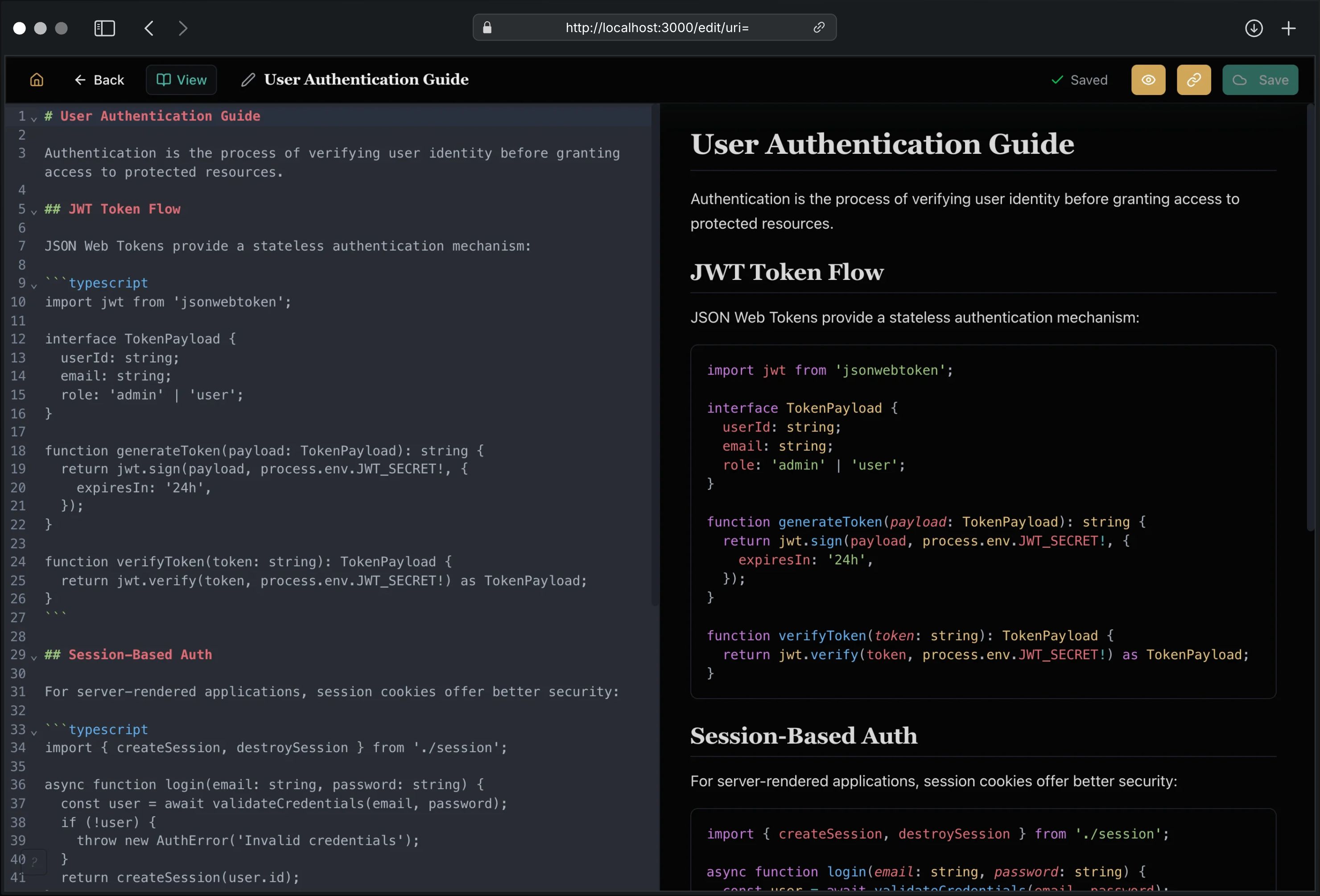
Document Editor
Create and edit documents directly in your browser:
- Split-view editing: CodeMirror 6 editor with live markdown preview
- Auto-save: Changes saved automatically with 2-second debounce
- Quick capture: Press N anywhere to create a new note instantly
- Command palette: Press ⌘K / Ctrl+K to jump, open, or create in context
- Syntax highlighting: Code blocks rendered with Shiki
- Keyboard shortcuts: ⌘S to save, ⌘B for bold, ⌘I for italic
- Safe editing: Converted PDF/DOCX/etc. sources stay read-only; create a markdown copy instead
- Wiki linking: Type
[[for note autocomplete and linked-note creation - Preset scaffolds: Apply note presets and insert structured sections while editing
Document Viewer
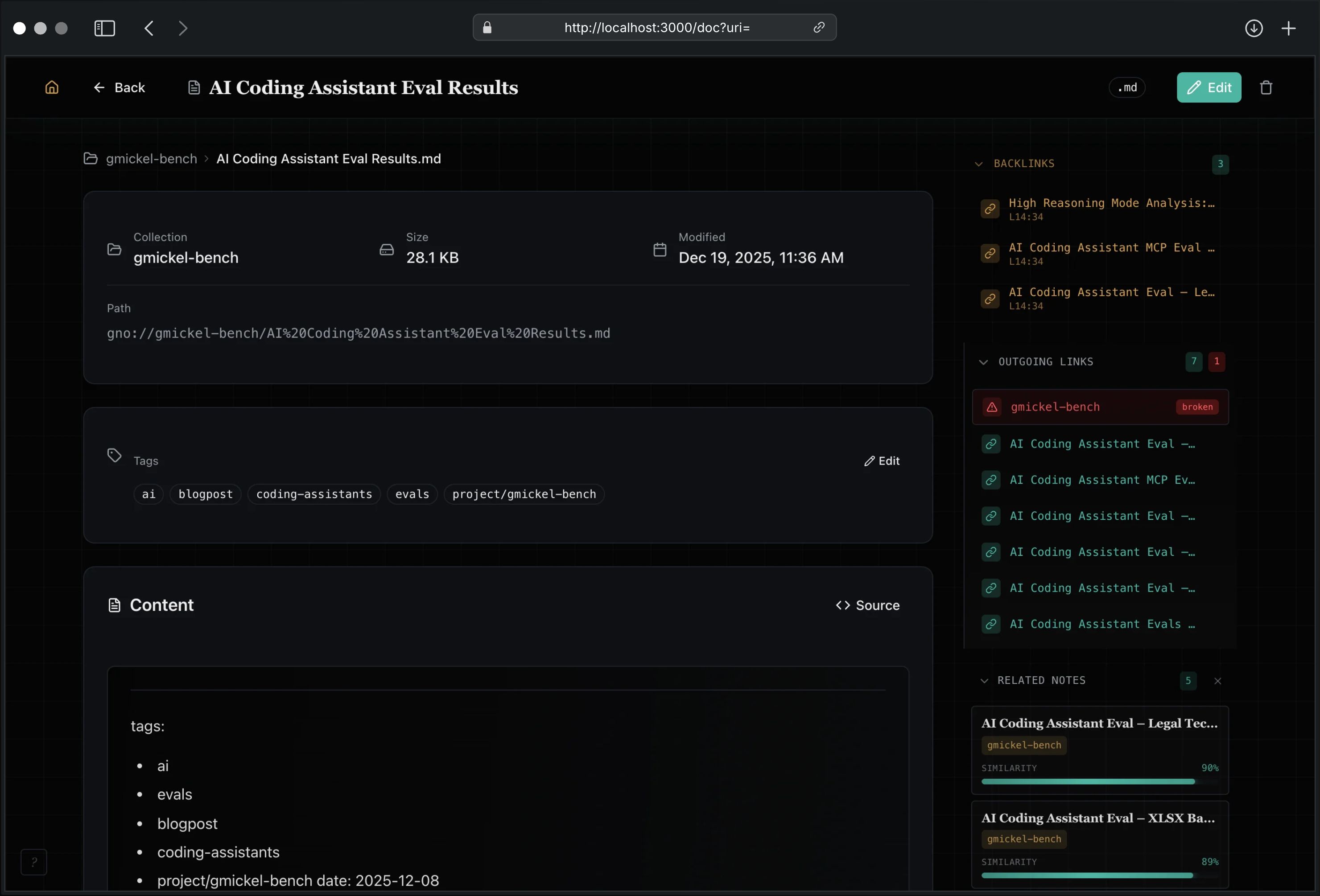
View documents with full context:
- Outgoing links: See all wiki and markdown links from this document
- Backlinks: Discover what documents link to this one
- Related notes: AI-powered suggestions based on semantic similarity
- Quick navigation: Click any link to jump to that document
- Deep links: Copy links to exact documents and source-view line targets
- Outline rail: Jump to sections and copy deep links to note headings
- External change awareness: Reload when a file changes on disk
Knowledge Graph
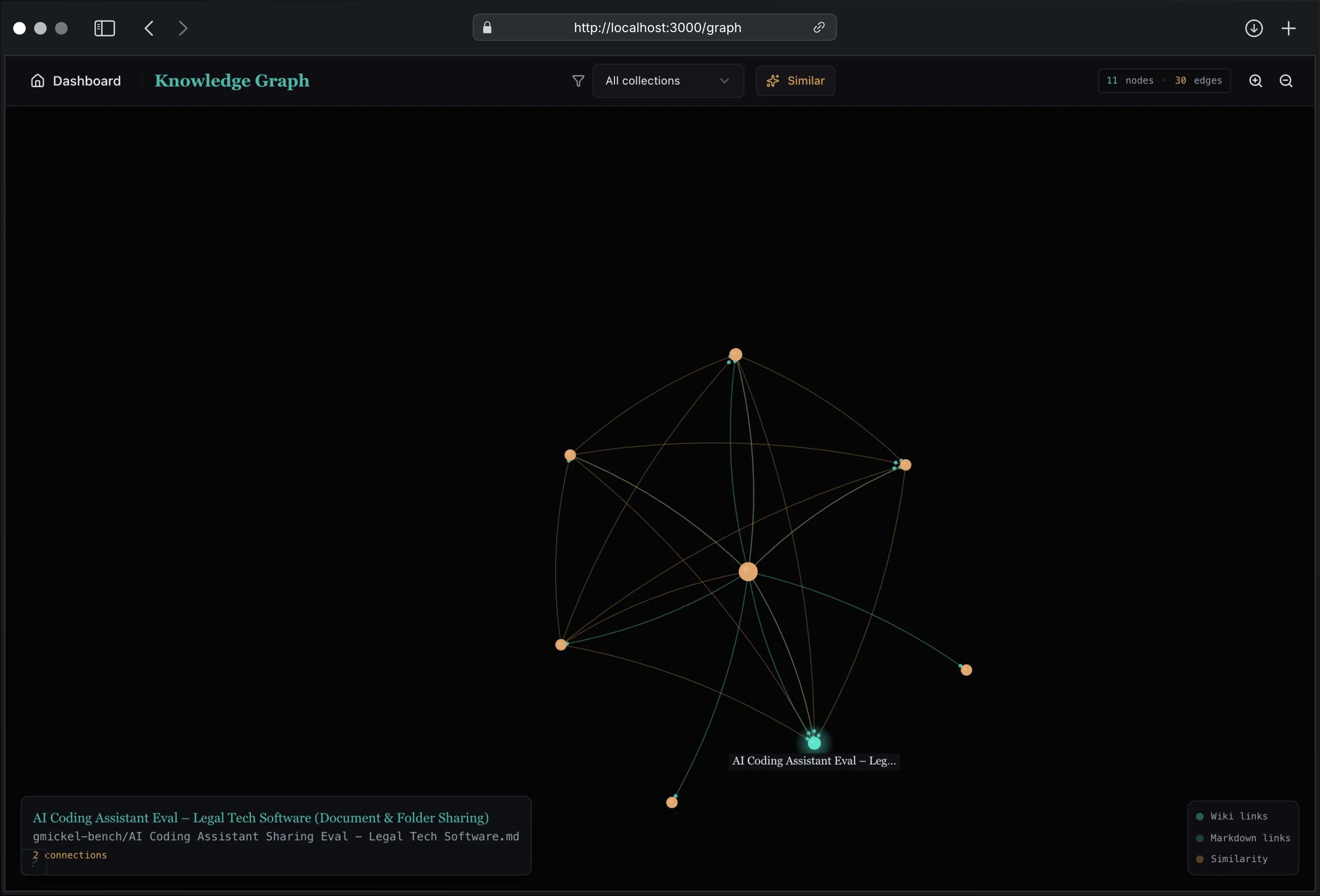
Visualize connections between your documents:
- Interactive graph: Zoom, pan, and explore document relationships
- Multiple edge types: Wiki links, markdown links, and similarity edges
- Collection filtering: Focus on specific knowledge areas
- Click to navigate: Jump to any document from the graph
Learn more about the Knowledge Graph →
Dashboard
See your index at a glance:
- Document count: How much you’ve indexed
- Chunk count: Searchable text segments
- Health status: Is everything working?
- Collections: Jump to any source
- Live updates: Reindex changes show up without manual refresh after edits
Browse Workspace
Navigate your indexed notes like a real workspace, not just a flat table:
- Cross-collection tree: browse all collections from one sidebar
- Folder detail panes: inspect subfolders and direct documents for the selected node
- In-place creation: create notes and folders from the current browse context
- Tab-scoped state: each app tab can keep its own expanded browse context
- Pinned collections: keep favorite roots close while moving through the tree
- Breadcrumbs: jump back up the current folder path quickly
- Command actions: rename, move, duplicate, and section-jump flows from the palette
Three Search Modes
Choose the right tool for the job:
| Mode | Best For |
|---|---|
| BM25 | Exact terms, code identifiers |
| Vector | Concepts, natural language |
| Hybrid | Best accuracy (recommended) |
Tag Filtering
Filter search results visually with the tag system:
- Sidebar facets: See all tags with document counts, click to filter
- Filter chips: Active filters appear above results, click X to remove
- Tag autocomplete: When editing, get suggestions from existing tags
- AND/OR modes: Toggle between match-any and match-all filtering
Tags are extracted automatically from markdown frontmatter. Manage tags directly in the document editor or via the sidebar.
AI Answers
Type a question, get a cited answer:
“What did we decide about the authentication flow?”
GNO searches your documents, synthesizes an answer using a local LLM, and shows citations linking back to sources.
Live Preset Switching
Switch between model presets without restarting:
- Slim: Default, fast, ~1GB disk
- Balanced: Slightly larger, ~2GB disk
- Quality: Best answers, ~2.5GB disk
Click the preset selector, choose your preference, and GNO reloads models automatically.
In-Browser Model Download
Missing models? Download them directly from the UI:
- Open the preset selector
- Click Download Models
- Watch the progress bar
- Start using AI features immediately
No terminal required. Everything happens in the browser.
Privacy by Design
Everything runs on localhost:
- No cloud services
- No user accounts
- No data leaves your machine
- No tracking or telemetry
The server binds to 127.0.0.1 only. It’s not accessible from your network.
Get Started
# Install GNO
bun install -g @gmickel/gno

# Index your documents
gno init ~/notes --name notes
gno index

# Start the web UI
gno serve
Then open http://localhost:3000.
For Developers
The Web UI is powered by a REST API you can use programmatically. Build custom integrations, automate workflows, or create your own tools.
# Search via API
curl -X POST http://localhost:3000/api/query \
  -H "Content-Type: application/json" \
  -d '{"query": "authentication"}'
See the API Reference for full documentation.